I am participating in a hackathon which made it necessary for me to learn some Python. In particular, I was documenting on how to get SQLite setup as nobody seemed to get the full details. As usual, I try to go first principles on this so that I can get a better understanding.
I am using Visual Studio 2017 Community and have the Python Development workload. This made Python available to me which is great, but I also needed SQLite. The setup for SQLite is very straightforward as it is simply a matter of copying a DLL. However, big unanswered questions remain that are not really answered anywhere for a newbie like me: Where do I copy the SQLite DLL? How does the Python code find the SQLite DLL?
Long story ... but it appears that SQLite is actually bundled into Python (at least in v3.6 that I am using).
python
import sqlite3
sqlite3.version
# WTH - that is not the right version???
# Aha - found this that explains it: https://www.obsidianforensics.com/blog/upgrading-python-sqlite
sqlite3.sqlite_version
# Hmm... I wonder what other properties are available?
sqlite3.__dir__()
... and from the site above, I also upgraded to the latest version
Wednesday, December 13, 2017

Tuesday, July 18, 2017
SPEndPointAddressNotFoundException: There are no addresses available for this application
From time to time, I would receive support requests where some backend services was stopped for whatever reason. From an end user point of view, they only see that something is no longer working. However, looking at ULS, it becomes very obvious as you would see this kind of exception:
Also, here is a link to a very useful description about the SharePoint Topology Service:
https://blogs.msdn.microsoft.com/besidethepoint/2011/02/19/how-i-learned-to-stop-worrying-and-love-the-sharepoint-topology-service/
SPEndPointAddressNotFoundException: There are no addresses available for this application.
Typically, this is either a matter of restarting the service instances and / or running the Application Address Refresh Job
Here is also some powershell to see what the SharePoint Round Robin Load Balancer sees:
$proxyName = 'proxy name'
$saName = 'service application name'
$proxy = Get-SPServiceApplicationProxy | Where-Object {$_.TypeName -eq $proxyName}
$loadBalancer = $proxy.LoadBalancer
$loadBalancerContext = $loadBalancer.BeginOperation()
$loadBalancerContext.EndpointAddress
$sa = Get-SPServiceApplication -Name $saName
$sa.EndPoints | Format-List
One other common thing is to be specific about the SharePoint Round Robin Load Balancer. I often have to clarify that this is for backend services as often SharePoint admins get this mixed up with a WFE load balancer.
Also, here is a link to a very useful description about the SharePoint Topology Service:
https://blogs.msdn.microsoft.com/besidethepoint/2011/02/19/how-i-learned-to-stop-worrying-and-love-the-sharepoint-topology-service/
Thursday, July 6, 2017
Add-Type : Could not load file or assembly 'Microsoft.SqlServer.Smo, Version=9.0.242.0, Culture=neutral, PublicKeyToken=89845dcd8080cc91' or one of its dependencies. The system cannot find the file specified.
I am new to SQL Server Management Objects (SMO)
I tried
Add-Type -AssemblyName "Microsoft.SqlSever.Smo"
but got this error:
Add-Type : Could not load file or assembly 'Microsoft.SqlServer.Smo, Version=9.0.242.0, Culture=neutral, PublicKeyToken=89845dcd8080cc91' or one of its dependencies. The system cannot find the file specified.
I tried
Add-Type -AssemblyName "Microsoft.SqlSever.Smo"
Add-Type : Could not load file or assembly 'Microsoft.SqlServer.Smo, Version=9.0.242.0, Culture=neutral, PublicKeyToken=89845dcd8080cc91' or one of its dependencies. The system cannot find the file specified.
Knowing that my machine has had multiple versions of SQL and Visual Studio installed at some point, I decided to opt for the latest and provide the FullName of the assembly instead:
Add-Type -AssemblyName 'Microsoft.SqlServer.Smo, Version=13.0.0.0, Culture=neutral, PublicKeyToken=89845dcd8080cc91'
That seemed to work. Yes, I did get the assembly first to verify that all the referenced assemblies are there. Not sure why the loader would default to 9.0.242.0, but that is not my problem right now.
Wednesday, June 28, 2017
Grabbing EML files from drop folder before job-email-delivery gets them
Often when troubleshooting incoming email problems in SharePoint, we would temporarily disable the Microsoft SharePoint Foundation Incoming E-Mail (job-email-delivery) timer job, then send an email and watch the folder for an EML file to show up.
Alternatively, you can register a FileSystemWatcher to listen on a Created event. Then, this code can copy out the EML file to some safe place before job-email-delivery gets it.
To install the listener:
$destination = 'c:\Windows\Temp\maillogs' # Make sure your powershell user can write here
$dropFolder = 'C:\inetpub\mailroot\Drop' # Drop folder as configured in SharePoint
$filter = '*.eml'
$fsw = New-Object System.IO.FileSystemWatcher($dropFolder, $filter)
$fsw.IncludeSubdirectories = $false
$fsw.NotifyFilter = [System.IO.NotifyFilters]'FileName,LastWrite' # seems to need this to avoid some IOExceptions
$onCreated = Register-ObjectEvent -InputObject $fsw -EventName Created -Action {
Write-Host "$($Event.TimeGenerated) : Incoming email file - $($Event.SourceEventArgs.Name)"
Copy-Item $Event.SourceEventArgs.FullPath -Destination $destination -Force -Verbose
}
To remove the listener:
Unregister-Event -SourceIdentifier $onCreated.Name
$onCreated.Dispose()
Unknowns:
Alternatively, you can register a FileSystemWatcher to listen on a Created event. Then, this code can copy out the EML file to some safe place before job-email-delivery gets it.
To install the listener:
$destination = 'c:\Windows\Temp\maillogs' # Make sure your powershell user can write here
$dropFolder = 'C:\inetpub\mailroot\Drop' # Drop folder as configured in SharePoint
$filter = '*.eml'
$fsw = New-Object System.IO.FileSystemWatcher($dropFolder, $filter)
$fsw.IncludeSubdirectories = $false
$fsw.NotifyFilter = [System.IO.NotifyFilters]'FileName,LastWrite' # seems to need this to avoid some IOExceptions
$onCreated = Register-ObjectEvent -InputObject $fsw -EventName Created -Action {
Write-Host "$($Event.TimeGenerated) : Incoming email file - $($Event.SourceEventArgs.Name)"
Copy-Item $Event.SourceEventArgs.FullPath -Destination $destination -Force -Verbose
}
To remove the listener:
Unregister-Event -SourceIdentifier $onCreated.Name
$onCreated.Dispose()
Unknowns:
- Does not account for large incoming files that are temporarily locked while being copied
- Not sure if this causes problems if job-email-delivery tries to access (or even remove) file while Copy-Item is being called.
- Not sure if this is guaranteed to happen before job-email-delivery
- Not sure of the performance impact
Thursday, April 27, 2017
SharePoint 2013 - Sign in as a different user
I keep forgetting this, so noting it down here:
_layouts/closeConnection.aspx?loginasanotheruser=true
_layouts/closeConnection.aspx?loginasanotheruser=true
Wednesday, April 19, 2017
Calling constructor of an internal class
I keep running into code that tries to "hide" from being used such as making classes internal or private. It is a royal pain in the ass when debugging.
Fortunately, reflection is very easy with powershell so we can do something like this:
$parameters = @(some-array-of-parameters)
$assemblyName='full-name-of-the-assembly'
$typeName = 'full-name-of-the-type'
Add-Type -AssemblyName $assemblyName
$assembly = [Reflection.Assembly]::Load($assemblyName)
$bindingFlags = [Reflection.BindingFlags]"Default,NonPublic" # also include Static if needed
$t = $assembly.GetType($typeName)
$m = $t.GetConstructors() | Where-Object {$_.GetParameters().Count -gt 0} # in my case, I happen to be looking for a non-default constructor
$myclassinstance = $m.Invoke($parameters)
Fortunately, reflection is very easy with powershell so we can do something like this:
$parameters = @(some-array-of-parameters)
$assemblyName='full-name-of-the-assembly'
$typeName = 'full-name-of-the-type'
Add-Type -AssemblyName $assemblyName
$assembly = [Reflection.Assembly]::Load($assemblyName)
$bindingFlags = [Reflection.BindingFlags]"Default,NonPublic" # also include Static if needed
$t = $assembly.GetType($typeName)
$m = $t.GetConstructors() | Where-Object {$_.GetParameters().Count -gt 0} # in my case, I happen to be looking for a non-default constructor
$myclassinstance = $m.Invoke($parameters)
Tuesday, April 4, 2017
SocialDataManager.SocialDataManager Proxy has no ServiceContext available
Just ran into this issue when trying to instantiate Microsoft.Office.Server.SocialData.SocialTagManager in powershell:
$siteUrl = 'some-site-url'
$site = Get-SPSite $siteUrl
$serviceContext = Get-SPServiceContext($site)
$msstm = New-Object Microsoft.Office.Server.SocialData.SocialTagManager($serviceContext)
New-Object : Exception calling ".ctor" with "1" argument(s): "UserProfileApplicationNotAvailableException_Logging :: SocialDataManager.SocialDataManager Proxy has no ServiceContext available."
At line:1 char:10
+ $msstm = New-Object Microsoft.Office.Server.SocialData.SocialTagManager($service ...
+ ~~~~~~~~~~~~~~~~~~~~~~~~~~~~~~~~~~~~~~~~~~~~~~~~~~~~~~~~~~~~~~~~~~~~~~~
+ CategoryInfo : InvalidOperation: (:) [New-Object], MethodInvocationException
+ FullyQualifiedErrorId : ConstructorInvokedThrowException,Microsoft.PowerShell.Commands.NewObjectCommand
$siteUrl = 'some-site-url'
$site = Get-SPSite $siteUrl
$serviceContext = Get-SPServiceContext($site)
$msstm = New-Object Microsoft.Office.Server.SocialData.SocialTagManager($serviceContext)
New-Object : Exception calling ".ctor" with "1" argument(s): "UserProfileApplicationNotAvailableException_Logging :: SocialDataManager.SocialDataManager Proxy has no ServiceContext available."
At line:1 char:10
+ $msstm = New-Object Microsoft.Office.Server.SocialData.SocialTagManager($service ...
+ ~~~~~~~~~~~~~~~~~~~~~~~~~~~~~~~~~~~~~~~~~~~~~~~~~~~~~~~~~~~~~~~~~~~~~~~
+ CategoryInfo : InvalidOperation: (:) [New-Object], MethodInvocationException
+ FullyQualifiedErrorId : ConstructorInvokedThrowException,Microsoft.PowerShell.Commands.NewObjectCommand
Not much out there, but the UserProfileApplicationNotAvailableException provided a clue. I did not track down the specific cause, but it looks like I was not running powershell with an account that admin permissions in the UPA or MMS. I did not have time to dig further, but instead simply opened up my powershell as the farm account and did not run into the same problem.
Wednesday, March 22, 2017
Finding Alias for SharePoint Email Enabled Lists
As usual, there are several ways to do this that can be readily found via a search
Powershell: Loop through each Web Application, Site Collection (SPSite), Subweb (SPWeb), List. Then look in the EmailAlias property for what you are searching. In large environments, I suspect that this would be very slow and resource intensive. Here is a Foreach-Object pipeline that would do the trick:
Get-SPWebApplication | ForEach-Object {$_.Sites} | ForEach-Object {$_.AllWebs} | ForEach-Object {$_.Lists} | Where-Object {$_.CanReceiveEmail -and $_.EmailAlias} | Format-Table EmailAlias, Title, ParentWebUrl -AutoSize
SQL: One way is to essentially do the above but via the content databases, but this one also seems resource intensive:
USE [Some_Content_DB]
SELECT tp_Title, tp_EmailAlias, FullUrl
FROM [dbo].[AllLists] lists
LEFT JOIN [dbo].[AllWebs] webs ON lists.tp_WebId = webs.Id
WHERE tp_EmailAlias IS NOT NULL
Powershell: Loop through each Web Application, Site Collection (SPSite), Subweb (SPWeb), List. Then look in the EmailAlias property for what you are searching. In large environments, I suspect that this would be very slow and resource intensive. Here is a Foreach-Object pipeline that would do the trick:
Get-SPWebApplication | ForEach-Object {$_.Sites} | ForEach-Object {$_.AllWebs} | ForEach-Object {$_.Lists} | Where-Object {$_.CanReceiveEmail -and $_.EmailAlias} | Format-Table EmailAlias, Title, ParentWebUrl -AutoSize
SQL: One way is to essentially do the above but via the content databases, but this one also seems resource intensive:
USE [Some_Content_DB]
SELECT tp_Title, tp_EmailAlias, FullUrl
FROM [dbo].[AllLists] lists
LEFT JOIN [dbo].[AllWebs] webs ON lists.tp_WebId = webs.Id
WHERE tp_EmailAlias IS NOT NULL
SQL: I decided to see what the Microsoft SharePoint Foundation Incoming E-Mail timer job does (job-email-delivery) since the timer job should be quite fast. Looking at the code, I can see that it calls the proc_getEmailEnabledListByAlias stored procedure. Diving into that, I see that this may be a better query:
SELECT * FROM [SharePoint_Config].[dbo].[EmailEnabledLists]
However, I did also run across a post mentioning that it is possible the Config database and the Content database can be out of sync. So, it may still be necessary to choose the correct method depending on the problem one is trying to tackle.
Wednesday, December 28, 2016
Faking Microsoft.SharePoint.ServiceContext.Current with Powershell
While debugging some server side code, I tried to mimic it in Powershell. The challenge was that the backend code relied on Microsoft.SharePoint.SPServiceContext.Current. Fortunately, there are many posts on how to do this including:
Frustratingly, none of this was working when I tried. I was running as the Farm Account.
Then, I came across this: http://blog.claudiobrotto.com/2011/sharepoint-management-shell-vs-standard-powershell-console/
I normally use just the Windows Powershell while on my servers and call Add-PSSnapin Microsoft.SharePoint.Powershell. However, I forgot that the SPServiceContext::Current is being lost when a new thread is being used.
I added the following and all is good again:
$Host.RunSpace.ThreadOptions = 'ReuseThread'
- http://sadomovalex.blogspot.ca/2012/10/fix-nullreferenceexception-when-use.html
- https://pholpar.wordpress.com/2013/07/15/injecting-httpcontext-and-spcontext-into-your-powershell-scripts/
- ... and many others
Frustratingly, none of this was working when I tried. I was running as the Farm Account.
Then, I came across this: http://blog.claudiobrotto.com/2011/sharepoint-management-shell-vs-standard-powershell-console/
I normally use just the Windows Powershell while on my servers and call Add-PSSnapin Microsoft.SharePoint.Powershell. However, I forgot that the SPServiceContext::Current is being lost when a new thread is being used.
I added the following and all is good again:
$Host.RunSpace.ThreadOptions = 'ReuseThread'
Outlook add-in logging
I recently inherited support of an Outlook plugin (add-in) and needed to output a few more debugging statements. I put those lines into the code, but not events were logged into the Event Viewer Application Log as expected. Fumbling around I saw this: https://msdn.microsoft.com/en-us/library/ms269003.aspx?f=255&MSPPError=-2147217396 and added an environment variable VSTO_SUPPRESSDISPLAYALERTS = 0.
Wednesday, November 23, 2016
SPList.GetItems(SPQuery) appears to miss items if paging info not precise
We have some code that uses SPList.GetItems(SPQuery) with paging info.
The list items we were running against had the following values:
ID Created
-- -------
51 8/30/2016 8:02:40 AM
49 8/12/2016 2:42:26 PM
48 6/27/2016 3:39:05 AM
46 6/21/2016 4:04:28 PM
45 6/21/2016 3:10:18 PM
44 6/21/2016 2:32:13 PM
43 6/21/2016 3:56:01 AM
42 6/20/2016 6:32:34 AM
41 6/20/2016 4:55:47 AM
39 6/14/2016 1:30:05 PM <-- The last item on page 1
38 6/14/2016 11:34:51 AM <-- Should be the first item on page 2
37 6/14/2016 10:21:22 AM <-- With our bad code, this one is first on page 2
36 6/14/2016 8:48:43 AM
35 6/9/2016 12:56:16 AM
32 5/25/2016 11:38:44 PM
29 5/9/2016 9:43:31 AM
28 5/9/2016 9:35:38 AM
26 4/28/2016 8:19:59 AM
The list items we were running against had the following values:
ID Created
-- -------
51 8/30/2016 8:02:40 AM
49 8/12/2016 2:42:26 PM
48 6/27/2016 3:39:05 AM
46 6/21/2016 4:04:28 PM
45 6/21/2016 3:10:18 PM
44 6/21/2016 2:32:13 PM
43 6/21/2016 3:56:01 AM
42 6/20/2016 6:32:34 AM
41 6/20/2016 4:55:47 AM
39 6/14/2016 1:30:05 PM <-- The last item on page 1
38 6/14/2016 11:34:51 AM <-- Should be the first item on page 2
37 6/14/2016 10:21:22 AM <-- With our bad code, this one is first on page 2
36 6/14/2016 8:48:43 AM
35 6/9/2016 12:56:16 AM
32 5/25/2016 11:38:44 PM
29 5/9/2016 9:43:31 AM
28 5/9/2016 9:35:38 AM
26 4/28/2016 8:19:59 AM
Due to a bug in our code (timezone conversion!), we were providing an SPListItemCollectionPosition containing an incorrect value for the Created property. As a result, SPList.GetItems gets the first row that matches both criteria. This leads to the appearance that the paginated data is missing rows.
For example:
$webUrl = 'some-web-url';
$rowLimit = 10;
$goodPage = 'Paged=TRUE&p_ID=39&p_Created=20160614%2013%3A30%3A05';
$badPage = 'Paged=TRUE&p_ID=39&p_Created=20160614%2011%3A30%3A05';
$web = Get-SPWeb $webUrl;
$list = $web.Lists['some-list'];
$spquery = New-Object Microsoft.SharePoint.SPQuery;
$spquery.Query = "<OrderBy><FieldRef Name='Created' Ascending='False' /></OrderBy>";
$spquery.RowLimit = $rowLimit;
$spquery.ListItemCollectionPosition = New-Object Microsoft.SharePoint.SPListItemCollectionPosition($goodPage);
$list.GetItems($spquery) | Format-Table ID, Name, @{l='Created'; e={$_['Created']}} -AutoSize;
$spquery.ListItemCollectionPosition = New-Object Microsoft.SharePoint.SPListItemCollectionPosition($badPage);
$list.GetItems($spquery) | Format-Table ID, Name, @{l='Created'; e={$_['Created']}} -AutoSize;
$list.GetItems("Id", "Created", "Name") | Format-Table ID, Name, @{l='Created'; e={$_['Created']}} -AutoSize;
Using the above powershell, the results from $goodPage works as expected. However, with $badPage, the time is off by 2 hours (we provided 11:30:05 instead of 13:30:05). Since we are sorting descending by Created, the wrong page info value causes the entry at 11:34:51 to be skipped as well. Oops!
The field with Id {field-GUID} defined in feature {feature-GUID} was found in the current site collection or in a subsite.
One of my site collection features is failing to activate and throws this exception:
SPException thrown: Message: The field with Id {field-GUID} defined in feature {feature-GUID} was found in the current site collection or in a subsite.. Stack:
at Microsoft.SharePoint.Utilities.SPUtility.ThrowSPExceptionWithTraceTag(UInt32 tagId, ULSCat traceCategory, String resourceId, Object[] resourceArgs)
at Microsoft.SharePoint.Administration.SPElementDefinitionCollection.ProvisionFieldsAndContentTypes(SPFeaturePropertyCollection props, SPSite site, SPWeb web, SPFeatureActivateFlags activateFlags, Boolean fForce)
at Microsoft.SharePoint.Administration.SPElementDefinitionCollection.ProvisionElements(SPFeaturePropertyCollection props, SPWebApplication webapp, SPSite site, SPWeb web, SPFeatureActivateFlags activateFlags, Boolean fForce)
at Microsoft.SharePoint.SPFeature.Activate(SPSite siteParent, SPWeb webParent, SPFeaturePropertyCollection props, SPFeatureActivateFlags activateFlags, Boolean fForce)
at Microsoft.SharePoint.SPFeatureCollection.AddInternal(SPFeatureDefinition featdef, Version version, SPFeaturePropertyCollection properties, SPFeatureActivateFlags activateFlags, Boolean force, Boolean fMarkOnly)
at Microsoft.SharePoint.SPFeatureCollection.AddInternalWithName(Guid featureId, Int32 compatibilityLevel, String featureName, Version version, SPFeaturePropertyCollection properties, SPFeatureActivateFlags activateFlags, Boolean force, Boolean fMarkOnly, SPFeatureDefinitionScope featdefScope)
at Microsoft.SharePoint.WebControls.FeatureActivator.ActivateFeature(Guid featid, Int32 compatibilityLevel, SPFeatureDefinitionScope featdefScope)
at Microsoft.SharePoint.WebControls.FeatureActivatorItem.ToggleFeatureActivation()
at System.Web.UI.WebControls.Button.RaisePostBackEvent(String eventArgument)
at System.Web.UI.Page.ProcessRequestMain(Boolean includeStagesBeforeAsyncPoint, Boolean includeStagesAfterAsyncPoint)
at System.Web.UI.Page.ProcessRequest(Boolean includeStagesBeforeAsyncPoint, Boolean includeStagesAfterAsyncPoint)
at System.Web.UI.Page.ProcessRequest()
at System.Web.UI.Page.ProcessRequest(HttpContext context)
at System.Web.HttpApplication.CallHandlerExecutionStep.System.Web.HttpApplication.IExecutionStep.Execute()
at System.Web.HttpApplication.ExecuteStep(IExecutionStep step, Boolean& completedSynchronously)
at System.Web.HttpApplication.PipelineStepManager.ResumeSteps(Exception error)
at System.Web.HttpApplication.BeginProcessRequestNotification(HttpContext context, AsyncCallback cb)
at System.Web.HttpRuntime.ProcessRequestNotificationPrivate(IIS7WorkerRequest wr, HttpContext context)
at System.Web.Hosting.PipelineRuntime.ProcessRequestNotificationHelper(IntPtr rootedObjectsPointer, IntPtr nativeRequestContext, IntPtr moduleData, Int32 flags)
at System.Web.Hosting.PipelineRuntime.ProcessRequestNotification(IntPtr rootedObjectsPointer, IntPtr nativeRequestContext, IntPtr moduleData, Int32 flags)
at System.Web.Hosting.UnsafeIISMethods.MgdIndicateCompletion(IntPtr pHandler, RequestNotificationStatus& notificationStatus)
at System.Web.Hosting.UnsafeIISMethods.MgdIndicateCompletion(IntPtr pHandler, RequestNotificationStatus& notificationStatus)
at System.Web.Hosting.PipelineRuntime.ProcessRequestNotificationHelper(IntPtr rootedObjectsPointer, IntPtr nativeRequestContext, IntPtr moduleData, Int32 flags)
at System.Web.Hosting.PipelineRuntime.ProcessRequestNotification(IntPtr rootedObjectsPointer, IntPtr nativeRequestContext, IntPtr moduleData, Int32 flags)
SPException thrown: Message: The field with Id {field-GUID} defined in feature {feature-GUID} was found in the current site collection or in a subsite.. Stack:
at Microsoft.SharePoint.Utilities.SPUtility.ThrowSPExceptionWithTraceTag(UInt32 tagId, ULSCat traceCategory, String resourceId, Object[] resourceArgs)
at Microsoft.SharePoint.Administration.SPElementDefinitionCollection.ProvisionFieldsAndContentTypes(SPFeaturePropertyCollection props, SPSite site, SPWeb web, SPFeatureActivateFlags activateFlags, Boolean fForce)
at Microsoft.SharePoint.Administration.SPElementDefinitionCollection.ProvisionElements(SPFeaturePropertyCollection props, SPWebApplication webapp, SPSite site, SPWeb web, SPFeatureActivateFlags activateFlags, Boolean fForce)
at Microsoft.SharePoint.SPFeature.Activate(SPSite siteParent, SPWeb webParent, SPFeaturePropertyCollection props, SPFeatureActivateFlags activateFlags, Boolean fForce)
at Microsoft.SharePoint.SPFeatureCollection.AddInternal(SPFeatureDefinition featdef, Version version, SPFeaturePropertyCollection properties, SPFeatureActivateFlags activateFlags, Boolean force, Boolean fMarkOnly)
at Microsoft.SharePoint.SPFeatureCollection.AddInternalWithName(Guid featureId, Int32 compatibilityLevel, String featureName, Version version, SPFeaturePropertyCollection properties, SPFeatureActivateFlags activateFlags, Boolean force, Boolean fMarkOnly, SPFeatureDefinitionScope featdefScope)
at Microsoft.SharePoint.WebControls.FeatureActivator.ActivateFeature(Guid featid, Int32 compatibilityLevel, SPFeatureDefinitionScope featdefScope)
at Microsoft.SharePoint.WebControls.FeatureActivatorItem.ToggleFeatureActivation()
at System.Web.UI.WebControls.Button.RaisePostBackEvent(String eventArgument)
at System.Web.UI.Page.ProcessRequestMain(Boolean includeStagesBeforeAsyncPoint, Boolean includeStagesAfterAsyncPoint)
at System.Web.UI.Page.ProcessRequest(Boolean includeStagesBeforeAsyncPoint, Boolean includeStagesAfterAsyncPoint)
at System.Web.UI.Page.ProcessRequest()
at System.Web.UI.Page.ProcessRequest(HttpContext context)
at System.Web.HttpApplication.CallHandlerExecutionStep.System.Web.HttpApplication.IExecutionStep.Execute()
at System.Web.HttpApplication.ExecuteStep(IExecutionStep step, Boolean& completedSynchronously)
at System.Web.HttpApplication.PipelineStepManager.ResumeSteps(Exception error)
at System.Web.HttpApplication.BeginProcessRequestNotification(HttpContext context, AsyncCallback cb)
at System.Web.HttpRuntime.ProcessRequestNotificationPrivate(IIS7WorkerRequest wr, HttpContext context)
at System.Web.Hosting.PipelineRuntime.ProcessRequestNotificationHelper(IntPtr rootedObjectsPointer, IntPtr nativeRequestContext, IntPtr moduleData, Int32 flags)
at System.Web.Hosting.PipelineRuntime.ProcessRequestNotification(IntPtr rootedObjectsPointer, IntPtr nativeRequestContext, IntPtr moduleData, Int32 flags)
at System.Web.Hosting.UnsafeIISMethods.MgdIndicateCompletion(IntPtr pHandler, RequestNotificationStatus& notificationStatus)
at System.Web.Hosting.UnsafeIISMethods.MgdIndicateCompletion(IntPtr pHandler, RequestNotificationStatus& notificationStatus)
at System.Web.Hosting.PipelineRuntime.ProcessRequestNotificationHelper(IntPtr rootedObjectsPointer, IntPtr nativeRequestContext, IntPtr moduleData, Int32 flags)
at System.Web.Hosting.PipelineRuntime.ProcessRequestNotification(IntPtr rootedObjectsPointer, IntPtr nativeRequestContext, IntPtr moduleData, Int32 flags)
I found a lot of references out there saying to redeploy the solution or use Overwrite="TRUE" in the field definition. However, not satisfied with either, I dug deeper.
I put this powershell together to figure out where the fields are coming from:
$siteUrl = 'site-collection-url'
$fieldId = 'field-GUID'
$fieldInternalName = 'field-internal-name'
$site = Get-SPSite $siteUrl
$webFields = @()
foreach ($web in $site.AllWebs) {
foreach ($field in $web.Fields) {
$webField = New-Object PSObject -Property ([ordered]@{
WebUrl = $web.Url
FieldId = $field.Id
FieldInternalName = $field.InternalName
FieldTitle = $field.Title
})
$webFields += $webField
}
}
$webFields | Where-Object {$_.FieldId -eq $fieldId -or $_.FieldInternalName -eq $fieldInternalName} | Format-Table -AutoSize
From the results, I found 2 subwebs that contained this same definition. It looks like these subwebs were migrated into that site collection. Is is possible that this was done before the site collection feature was activated. The migration process must have created the fields at the subweb level.
Going to each of the subwebs listed by the powershell, I was able to go to Site Settings->Site Columns, locate my field, and delete it, Once these were deleted, I was able to activate my site collection feature.
Throttled:Query exceeds lookup column threshold
One of my apps gets its data via lists.asmx. In a particular environment, no data was being returned and I found these entries in ULS:
Throttled:Query exceeds lookup column threshold. List item query elapsed time: 0 milliseconds, Additional data (if available): Query HRESULT: 80070093 List internal name, flags, and URL: {list-guid}, flags=0x0008000000c4108c, URL="web-url/_vti_bin/lists.asmx" Current User: {some-id} Query XML: "<Query><OrderBy><FieldRef Name="ContentType"/></OrderBy></Query>" SQL Query: "N/A"
Reference: This is a very well written article on GetListItems - https://msdn.microsoft.com/en-us/library/websvclists.lists.getlistitems(v=office.14).aspx
Throttled:Query exceeds lookup column threshold. List item query elapsed time: 0 milliseconds, Additional data (if available): Query HRESULT: 80070093 List internal name, flags, and URL: {list-guid}, flags=0x0008000000c4108c, URL="web-url/_vti_bin/lists.asmx" Current User: {some-id} Query XML: "<Query><OrderBy><FieldRef Name="ContentType"/></OrderBy></Query>" SQL Query: "N/A"
The query cannot be completed because the number of lookup columns it contains exceeds the lookup column threshold enforced by the administrator.
Query exceeds lookup column threshold. List: {list-guid}, View: , ViewXml: <View Scope="RecursiveAll" IncludeRootFolder="True"><Query><OrderBy><FieldRef Name="ContentType" /></OrderBy></Query><ViewFields>... and a whole ton of <FieldRef> entries.
SOAP exception: Microsoft.SharePoint.SPQueryThrottledException: The query cannot be completed because the number of lookup columns it contains exceeds the lookup column threshold enforced by the administrator. ---> System.Runtime.InteropServices.COMException (0x80070093): The query cannot be completed because the number of lookup columns it contains exceeds the lookup column threshold enforced by the administrator.
I found a few references to this, but it is not the more common 5000 item List View Threshold throttling. Instead this is the List View Lookup Threshold setting of 8 (12 in SharePoint 2013).
It turns out that my app is using the default view and not specifying which fields to return in the query. In fact, there is a Level=Medium ULS log entry that has my exact query. Putting this into powershell as follows, I was able to confirm the behaviour:
$webUrl = 'some-web-url'
$listName = '{list-guid}' # note: keep the curly braces
$credential = Get-Credential -Message "Enter your login for $($webUrl)"
$uri = [uri]"$($communityRoot)/_vti_bin/lists.asmx"
$contentType = 'text/xml'
$bodyString = @"
<?xml version="1.0" encoding="utf-8"?>
<soap12:Envelope xmlns:xsi="http://www.w3.org/2001/XMLSchema-instance" xmlns:xsd="http://www.w3.org/2001/XMLSchema" xmlns:soap12="http://www.w3.org/2003/05/soap-envelope">
<soap12:Body>
<GetListItems xmlns="http://schemas.microsoft.com/sharepoint/soap/">
<listName>$($listName)</listName>
<viewName></viewName>
<rowLimit>5000</rowLimit>
<query>
<Query xmlns="">
<OrderBy> <FieldRef Name="ContentType" /> </OrderBy>
</Query>
</query>
<viewFields><ViewFields xmlns="" /></viewFields>
<queryOptions>
<QueryOptions xmlns="http://schemas.microsoft.com/sharepoint/soap/">
<IncludeMandatoryColumns>FALSE</IncludeMandatoryColumns>
<IncludeAttachmentUrls>TRUE</IncludeAttachmentUrls>
<ViewAttributes Scope='RecursiveAll' IncludeRootFolder='True' />
<DateInUtc>TRUE</DateInUtc>
</QueryOptions>
</queryOptions>
</GetListItems>
</soap12:Body>
</soap12:Envelope>
"@
$result = Invoke-WebRequest -Credential $credential -Method Post -Uri $uri -Body $bodyString -ContentType $contentType
$result.RawContent
To confirm the view and the number of lookup columns, I used this powershell:
$webUrl = 'some-web-url'
$web = Get-SPWeb $webUrl
$list = $web.Lists['Shared Documents']
$fields = $list.Fields
$defaultViewXml = [xml]$list.DefaultView.GetViewXml()
Write-Output "Default View: $($list.DefaultView.Title)"
$defaultViewXml.View.ViewFields.FieldRef | Format-Table @{l="Type"; e={$fields.GetField($_.Name).TypeDisplayName}}, Name -AutoSize -Wrap
Reference: This is a very well written article on GetListItems - https://msdn.microsoft.com/en-us/library/websvclists.lists.getlistitems(v=office.14).aspx
Friday, November 11, 2016
Powershell Out-GridView: Column title ending in slash ('/') causes values not to show
I was trying to spit out a DataTable in Out-GridView where the column headers happen to be URLs. I noticed that sometimes the values of the columns are not displaying in Out-GridView when the column title ends in a slash.
eg:
$dt = New-Object System.Data.DataTable
$dt.Columns.Add("ColumnA")
$dt.Columns.Add("ColumnB/")
$dt.Rows.Add("row1a", "row1b")
$dt | Format-Table -AutoSize
$dt | Out-GridView
The output of $dt | Format-Table -AutoSize is:
ColumnA ColumnB/
------- --------
row1a row1b
The output of $dt | Out-GridView is:
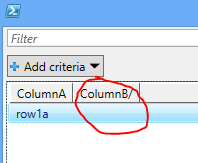
It looks like there is a bug in GridView there. For now, I can append .Trim('/') to my column titles.
It looks like trailing whitespace is a problem too: https://windowsserver.uservoice.com/forums/301869-powershell/suggestions/11718579-out-gridview-fails-to-display-data-for-properties
eg:
$dt = New-Object System.Data.DataTable
$dt.Columns.Add("ColumnA")
$dt.Columns.Add("ColumnB/")
$dt.Rows.Add("row1a", "row1b")
$dt | Format-Table -AutoSize
$dt | Out-GridView
The output of $dt | Format-Table -AutoSize is:
ColumnA ColumnB/
------- --------
row1a row1b
The output of $dt | Out-GridView is:
It looks like there is a bug in GridView there. For now, I can append .Trim('/') to my column titles.
It looks like trailing whitespace is a problem too: https://windowsserver.uservoice.com/forums/301869-powershell/suggestions/11718579-out-gridview-fails-to-display-data-for-properties
Thursday, November 10, 2016
Get WebTemplate / WebTemplateId from page source
Noting this down so I remember.
Reference: https://nickhobbs.wordpress.com/2013/05/18/sharepoint-how-to-check-which-site-template-was-used-to-create-a-site-just-using-a-web-browser/
- Go to page
- View source
- Look for g_wsaSiteTemplateId
Reference: https://nickhobbs.wordpress.com/2013/05/18/sharepoint-how-to-check-which-site-template-was-used-to-create-a-site-just-using-a-web-browser/
Wednesday, October 19, 2016
Fogbugz API logon and tokens
I was trying to write some scripts to automate some Fogbugz processes. However, we still use "FogBugz For Your Server".
In order to call the api.asp, you need to pass in a token. According to http://help.fogcreek.com/8447/how-to-get-a-fogbugz-xml-api-token#FogBugz_For_Your_Server, you need to pass in your email and password as command line parameters. Talk about lame.
Since I do not have FogBugz On Demand or FogBugz On Site, I do not have the Create API Token button.
Fortunately, I found via a network trace that the cookie value for fbToken can be used. No more query string plaintext passwords.
In order to call the api.asp, you need to pass in a token. According to http://help.fogcreek.com/8447/how-to-get-a-fogbugz-xml-api-token#FogBugz_For_Your_Server, you need to pass in your email and password as command line parameters. Talk about lame.
Since I do not have FogBugz On Demand or FogBugz On Site, I do not have the Create API Token button.
Fortunately, I found via a network trace that the cookie value for fbToken can be used. No more query string plaintext passwords.
Monday, April 25, 2016
Amazon Windows Activation Problems
Some of my instances recently started showing up with the black background with:
Error: 0xC004F074 The Software Licensing Service reported that the computer could not be activated. The Key Management Service (KMS) is unavailable.
Error: 0xC004F074 The Software Licensing Service reported that the computer could not be activated. The Key Management Service (KMS) is unavailable.
I recall having done this a long time ago and searching around I found some old correspondence from back in 2011 with Amazon Support that involved activating with the external IP of their KMS servers. However this was what was giving me that error. Unfortunately, I did not make good notes of that so I was going to have to figure out again. Fortunately, Internet to the rescue, I found this: http://kwjblogs.blogspot.ca/2012/01/amazon-ec2-instance-windows-activation.html
... and recalled essentially doing this:
slmgr.vbs /skms 169.254.169.250
slmgr.vbs /ato
Done. Now I also have noted it.
Wednesday, October 7, 2015
SPBasePermissions enumeration - values in Int64, Hexadecimal, and Name
$t = [type]'Microsoft.SharePoint.SPBasePermissions'
[enum]::GetValues($t) | ForEach-Object {Write-Host "$($_): $([int64]$_) (0x$([Convert]::ToString([int64]$_,16)))"}
Haven't figured out a way to use Format-Table for this, but good enough for now.
Thursday, July 30, 2015
Solutions, features, and CompatibilityLevel
I recently came across an issue where certain feature definitions were not available in 2010 mode sites in one farm, but they were in another. It turned out that the parameters supplied to Install-SPSolution are the reason. Essentially, the difference was specifying -CompatibilityLevel {14,15} vs specifying nothing. I found this article to be very helpful: Planning Deployment of Farm Solutions for SharePoint 2013
Monday, July 20, 2015
Error codes
Just some notes to myself on some resources to help decipher error codes that I often come across. These are sometimes mentioned in the ULS logs with something like hresult= or hr=
- ErrCo.de - awesome and searchable set of error codes on pretty much everything
- Win32 Error Codes
- MS-ERREF
- Description of HRESULT
Subscribe to:
Posts (Atom)