Wednesday, October 31, 2012

Could not provision App Management Service

I ran the Farm Configuration Wizard (gasp, yes I did) and it was mostly successful, but returned one error:

The service application(s) for the service "App Management Service" could not be provisioned because of the following error: Cannot open database "AppMng_Service_DB_c394cb934e0e483e9fff60b31aeaeb35" requested by the login. The login failed. Login failed for user '[some user]'


ULS is showing the following:

Failed to provision service application App Management Service System.Data.SqlClient.SqlException (0x80131904): Cannot open database "AppMng_Service_DB_c394cb934e0e483e9fff60b31aeaeb35" requested by the login. The login failed.  Login failed for user '[some user]'.    
 at System.Data.ProviderBase.DbConnectionPool.TryGetConnection(DbConnection owningObject, UInt32 waitForMultipleObjectsTimeout, Boolean allowCreate, Boolean onlyOneCheckConnection, DbConnectionOptions userOptions, DbConnectionInternal& connection)    
 at System.Data.ProviderBase.DbConnectionPool.TryGetConnection(DbConnection owningObject, TaskCompletionSource`1 retry, DbConnectionOptions userOptions, DbConnectionInternal& connection)    
 at System.Data.ProviderBase.DbConnectionFactory.TryGetConnection(DbConnection owningConnection, TaskCompletionSource`1 retry, DbConnectionOptions userOptions, DbConnectionInternal& connection)    
 at System.Data.ProviderBase.DbConnectionClosed.TryOpenConnection(DbConnection outerConnection, DbConnectionFactory connectionFactory, TaskCompletionSource`1 retry, DbConnectionOptions userOptions)    
 at System.Data.SqlClient.SqlConnection.TryOpen(TaskCompletionSource`1 retry)    
 at System.Data.SqlClient.SqlConnection.Open()    
 at Microsoft.SharePoint.Utilities.SqlSession.OpenConnection()    
 at Microsoft.SharePoint.Utilities.SqlSession.ExecuteReader(SqlCommand command, CommandBehavior behavior, SqlQueryData monitoringData, Boolean retryForDeadLock)    
 at Microsoft.SharePoint.Utilities.SqlSession.ExecuteReader(SqlCommand command, Boolean retryForDeadLock)    
 at Microsoft.SharePoint.Utilities.SqlSession.ExecuteReader(SqlCommand command)    
 at Microsoft.SharePoint.Upgrade.SPDatabaseSequence.GetVersion(SPDatabase database, Guid id, Version defaultVersion, SqlSession session, SPDatabaseSequence sequence)    
 at Microsoft.SharePoint.Upgrade.SPDatabaseSequence.GetVersion(Guid id, Version defaultVersion)    
 at Microsoft.SharePoint.Upgrade.SPDatabaseSequence.SetVersion(Guid id, Version version)    
 at Microsoft.SharePoint.Upgrade.SPDatabaseWssSequence.set_BuildVersion(Version value)    
 at Microsoft.SharePoint.Upgrade.SPSequence.set_NeedsUpgrade(Boolean value)    
 at Microsoft.SharePoint.Upgrade.SPUpgradeSession.NeedsUpgradeFalse(Object o)    
 at Microsoft.SharePoint.Administration.SPPersistedUpgradableObject.set_NeedsUpgrade(Boolean value)    
 at Microsoft.SharePoint.AppManagement.AppManagementServiceDatabase.Provision()    
 at Microsoft.SharePoint.AppManagement.AppManagementServiceApplication.Provision()    
 at Microsoft.SharePoint.Administration.SPAdminConfigServicesJob.Execute(Guid targetInstanceId)  ClientConnectionId:6b54fce5-06bc-4e2f-b6a9-c7d548253480 Source: .Net SqlClient Data Provider Server: AMAZONA-V5PUF8S LineNumber: 65536 StackTrace: 
 at onetnative.dll: (sig=6aba1f5f-ccc4-4590-af00-b8ffe7fe99a0|2|onetnative.pdb, offset=28BE6)
 at onetnative.dll: (offset=152A9)


However, SQL is not showing any connection attempts at that time, success or fail. I also verified that the account indeed has access to that database.

Regardless, it looks like the service application did get provisioned. Perhaps I will reprovision it.

More to come ...


Monday, October 29, 2012

Read-Host that is not assigned to a variable is added to return value

The best way I can illustrate this is as follows. Given this code for test.ps1:

Read-Host "Hit enter to continue"

try {
    throw system.exception
} catch {
    return $null
}

When I call test.ps1 I can expect a $null value, right? No. This is what happens:

> $a=.\test.ps1
Hit enter to continue:
> $a

> $a -eq $null
>
> $a.GetType()

IsPublic IsSerial Name                                     BaseType
-------- -------- ----                                     --------
True     True     Object[]                                 System.Array


> $a.Count
2
> $a[0]

> $a[1]
> $a[1] -eq $null
True

One would expect $a -eq $null to be true. Instead, $a is an array where the first value is that of Read-Host and the second value is the expected $null. 

So, I changed my code to the following:

$HitEnter = Read-Host "Hit enter to continue"

try {
    throw system.exception
} catch {
    return $null
}

Now everything works as expected:

> $a=.\test.ps1
Hit enter to continue:
> $a -eq $null

[Update 2013-05-27] Aha - found the reason behind this. Uncaptured output is still returned as output. Reference: Function Output Consists of Everything That Isn’t Captured

Friday, October 19, 2012

SharePoint 2013 HTTP Error 500 and 503

At some point after a reboot / iisreset or something else, I found that I could no longer get to my SharePoint sites nor to Central Administration. Each page was returning HTTP Error 500 or 503.

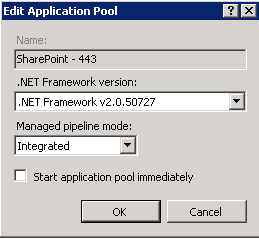
Of course, any time this happens, you need to take a look at IIS Admin. So opening it up, I see that all my application pools were offline. That's strange, it was just working a moment ago. Opening up the Basic Settings, I see this:
For some reason the Start application pool immediately box was unchecked. I then proceeded to check all of them and restarted my application pools and everything now works fine.

Weird.

Thursday, September 6, 2012

Server and AD trust relationships

Recently one of my servers started having trust issues. I would RDP to the server and it would appear to accept my domain login credentials fine, but then kick me back to the Windows server login screen with the following error:
The username or password is incorrect

I logged in as a local administrator and saw the following in the Security log
Unknown user name or bad password
... with the following status codes: 0xc000006d 0xc000006a

I tried disconnecting from the domain and reconnecting, with the required reboots, and now I get this error:
The trust relationship between this workstation and the primary domain failed

I tried to disconnect, remove the computer account, reconnect, but this resulted in this error:
The security database on the server does not have a computer account for this workstation trust relationship

This is very frustrating so finally, I did the following:
Disconnect from the domain (with a reboot)
Remove the computer account from AD
Reboot both the primary and secondary DCs
Rejoin the domain (with a reboot)

That finally worked. So, when in doubt reboot possibly everything.


Tuesday, August 21, 2012

Enabling Powershell Remoting

I manage a bunch of SharePoint farms and have finally gotten around to setting up Powershell Remoting to streamline some of my maintenance tasks.

Following the post Enable and Use Remote Commands in Windows PowerShell, I run the following on my remote servers:
Enable-PSRemoting -force

From my client machine, I tried the following:
$computername="MyComputerName"
$credential="MyCredential"
Enter-PSSession -Computername $computername -Credential $credential

This resulted in the following error:

Enter-PSSession : Connecting to remote server failed with the following error message : WinRM cannot process the request. The following error occured while using Kerberos authentication: The network path was not found.
 Possible causes are:
  -The user name or password specified are invalid.
  -Kerberos is used when no authentication method and no user name are specified.
  -Kerberos accepts domain user names, but not local user names.
  -The Service Principal Name (SPN) for the remote computer name and port does not exist.
  -The client and remote computers are in different domains and there is no trust between the two domains.
 After checking for the above issues, try the following:
  -Check the Event Viewer for events related to authentication.
  -Change the authentication method; add the destination computer to the WinRM TrustedHosts configuration setting or use HTTPS transport.
 Note that computers in the TrustedHosts list might not be authenticated.
   -For more information about WinRM configuration, run the following command: winrm help config. For more information,
 see the about_Remote_Troubleshooting Help topic.

I verified that my firewall was allowing the WinRM ports.

I set my trusted hosts on my remote servers using:
winrm s winrm/config/client '@{TrustedHosts="MyComputerName"}'

I then came across this post on how to enable Remote PSSession over SSL. I have a wildcard certificate for my domain. Modifying the script ever so slightly, I ran the following to enable HTTPS and disable HTTP transport
winrm create winrm/config/listener?Address=*+Transport=HTTPS `@`{Hostname=`"MyCertificateIssuedTo`"`; CertificateThumbprint=`"MyCertificateThumbprint`"`}
netsh advfirewall firewall add rule name="Windows Remote Management (HTTPS-In)" protocol=TCP dir=in localport=5986 action=allow
winrm set winrm/config/Listener?Address=*+Transport=HTTP `@`{Enabled=`"false`"`}
netsh advfirewall firewall set rule name="Windows Remote Management (HTTP-In)" new enable=no

Now I get the following error:

Enter-PSSession : Connecting to remote server failed with the following error message : The server certificate on the destination computer (MyComputerName) has the following errors:
The SSL certificate contains a common name (CN) that does not match the hostname. For more information, see the about_Remote_Troubleshooting Help topic.


Aha! Progress! Now looking at the Securing WinRM thread, I try the -SkipCACheck and -SkipCNCheck Session Options as described. Now I get the following error:

Enter-PSSession : Cannot bind parameter 'SessionOption'. Cannot convert the "Microsoft.WSMan.Management.SessionOption" value of type "Microsoft.WSMan.Management.SessionOption" to type "System.Management.Automation.Remoting.PSSessionOption".


It looks like some types have changed since that thread was posted. So, I used the following instead

Enter-PSSession -ComputerName $computername -Credential $credential -UseSSL -SessionOption (New-PSSessionOption -SkipCACheck -SkipCNCheck)


Success!

Monday, August 20, 2012

Locating unghosted pages

I recently came across a page that was giving me this error:
The control type '...' is not allowed on this page. The type is not registered as safe.

The obvious solution is to add a <SafeControl> tag to the web.config, but checking with my developer, he said it was not necessary and he does not have that declaration on his test server.

This led me to hypothesize that a custom branding we had was causing the problem to which my developer corroborated that unghosted master pages will cause problems.

So how to locate the unghosted pages? This led me to the following post: Ghosts in the Machine? However, this is for SharePoint 2007 so taking a leap of faith, I modified the SQL script provided and came up with this:

SELECT TOP 1000 
      [DirName]
      ,[LeafName]
      ,[SetupPath]
      ,[SetupPathUser]
  FROM [WSS_Content].[dbo].[AllDocs]
  where ([AllDocs].[Type] = 0)
  AND ([AllDocs].SetupPath IS NOT NULL)
  AND ([AllDocs].DocFlags & 64 = 64) 


Checking the reference for the AllDocs Table this query seemed to make sense.

Thursday, July 26, 2012

Creating Community subsites

I tried to create a community on my brand new SharePoint 2013 server.

First of all, the familiar Site Actions->New Site has been moved. You now have to open the gear menu, select View Site Content, then click new subsite. According to some blogs, there should be a Community template, but that does not appear on my list.

Recalling that a subweb can be converted to a community via activating the Community Site Feature, I just created a Blank Site and tried to activate the feature. This is when I ran into the following errors:

The Site scoped feature being activated has a dependency on hidden Site scoped feature 'FeatureDefinition/4326e7fc-f35a-4b0f-927c-36264b0a4cf0' (ID: '4326e7fc-f35a-4b0f-927c-36264b0a4cf0'). Hidden features cannot be auto-activated across scopes. There may be one or more visible Site scoped features that auto-activate the dependent hidden feature.
The Site scoped feature being activated has a dependency on hidden Site scoped feature 'FeatureDefinition/915c240e-a6cc-49b8-8b2c-0bff8b553ed3' (ID: '915c240e-a6cc-49b8-8b2c-0bff8b553ed3'). Hidden features cannot be auto-activated across scopes. There may be one or more visible Site scoped features that auto-activate the dependent hidden feature.
The Site scoped feature being activated has a dependency on hidden Site scoped feature 'FeatureDefinition/d32700c7-9ec5-45e6-9c89-ea703efca1df' (ID: 'd32700c7-9ec5-45e6-9c89-ea703efca1df'). Hidden features cannot be auto-activated across scopes. There may be one or more visible Site scoped features that auto-activate the dependent hidden feature.
The Site scoped feature being activated has a dependency on hidden Site scoped feature 'FeatureDefinition/947afd14-0ea1-46c6-be97-dea1bf6f5bae' (ID: '947afd14-0ea1-46c6-be97-dea1bf6f5bae'). Hidden features cannot be auto-activated across scopes. There may be one or more visible Site scoped features that auto-activate the dependent hidden feature.
The Site scoped feature being activated has a dependency on hidden Site scoped feature 'FeatureDefinition/c6a92dbf-6441-4b8b-882f-8d97cb12c83a' (ID: 'c6a92dbf-6441-4b8b-882f-8d97cb12c83a'). Hidden features cannot be auto-activated across scopes. There may be one or more visible Site scoped features that auto-activate the dependent hidden feature.

Curious about what these are? I ran the following Powershell
@("4326e7fc-f35a-4b0f-927c-36264b0a4cf0", "915c240e-a6cc-49b8-8b2c-0bff8b553ed3", "d32700c7-9ec5-45e6-9c89-ea703efca1df", "947afd14-0ea1-46c6-be97-dea1bf6f5bae", "c6a92dbf-6441-4b8b-882f-8d97cb12c83a") | ForEach-Object {Get-SPFeature $_}

and got the following:
DisplayName                    Id                                       CompatibilityLevel   Scope
-----------                    --                                       ------------------   -----
SocialSite                     4326e7fc-f35a-4b0f-927c-36264b0a4cf0     15                   Site
Ratings                        915c240e-a6cc-49b8-8b2c-0bff8b553ed3     15                   Site
CategoriesList                 d32700c7-9ec5-45e6-9c89-ea703efca1df     15                   Web
MembershipList                 947afd14-0ea1-46c6-be97-dea1bf6f5bae     15                   Web
AbuseReportsList               c6a92dbf-6441-4b8b-882f-8d97cb12c83a     15                   Web


Is there a feature that will activate all these as well? Searching around the internet, I did not find any so I figured why not try just activating the 2 site scoped ones using the following Powershell:

$site=Get-SPSite https://somesiteurl
$feature=Get-SPFeature "4326e7fc-f35a-4b0f-927c-36264b0a4cf0"
Enable-SPFeature -Identity $feature -Url $site.Url

$feature=Get-SPFeature " 915c240e-a6cc-49b8-8b2c-0bff8b553ed3 "

Enable-SPFeature -Identity $feature -Url $site.Url

I then went back to the Blank site and was able to activate the Community Site Feature.

I also tried new subsite and, lo and behold, the Community template is now there.

I am sure that someone will soon document how this should actually be done and that this will also be fixed in RTM, but until then, this works for me.